How to Use This Glossary
This glossary covers every term you will encounter in AI image generation. Terms are organized alphabetically in sections. Use the table of contents to jump to a specific letter range. Each definition includes which tools or platforms the term is most relevant to.
A - D
- Aspect Ratio (--ar)
- The proportional relationship between width and height. Common ratios: 1:1 (square), 16:9 (landscape), 9:16 (vertical/TikTok), 4:5 (Instagram portrait). Set with --ar in Midjourney or dimension controls in other tools.
- Batch Size
- Number of images generated simultaneously in one request. Larger batches use more VRAM but are more efficient overall. Midjourney generates 4 images per prompt by default.
- BREAK
- A keyword used in Stable Diffusion to separate prompt sections into different processing chunks. Prevents concepts from bleeding together. Example: "mountain landscape BREAK person in foreground."
- CFG Scale (Classifier-Free Guidance)
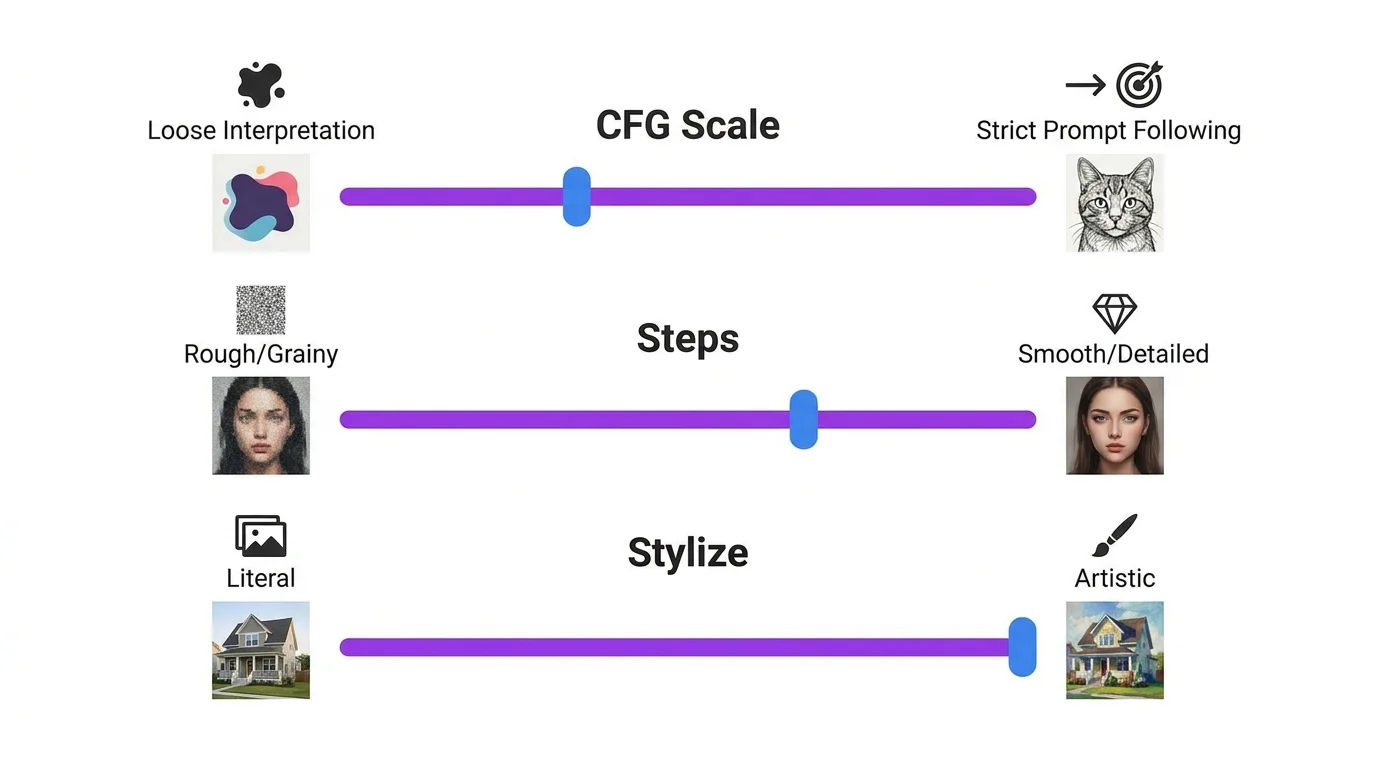
- Controls how strictly the AI follows your prompt. Range 1-30 in most tools. Low values (1-5) = creative freedom, the AI interprets loosely. High values (10+) = strict adherence but can look artificial. Sweet spot: 7-9. Used primarily in Stable Diffusion and Leonardo AI.
- Checkpoint
- A saved state of a trained AI model. Different checkpoints produce different visual styles - realistic, anime, 3D, etc. Downloaded as large files (2-7GB) and loaded into ComfyUI or Automatic1111. The "base model" that everything else builds on.
- ControlNet
- An extension for Stable Diffusion that provides spatial control over generations. Upload a pose skeleton, depth map, edge outline, or scribble, and the AI generates an image matching that structure. The most powerful composition control tool in AI art. See our SD guide.
- DALL-E
- OpenAI's AI image generation model, integrated into ChatGPT. Known for ease of use and conversational prompting. See our ChatGPT + DALL-E guide.
- Denoising Strength
- In img2img generation, controls how much the AI changes the input image. 0.0 = no change, 1.0 = completely new image. For subtle edits use 0.2-0.4. For major transformations use 0.6-0.8.
- Depth Map
- A grayscale image where brightness represents distance from camera. White = close, black = far. Used with ControlNet to control spatial layout of generated images.
- Diffusion Model
- The underlying AI architecture used by Stable Diffusion, Midjourney, DALL-E, and Flux. Works by starting with noise and gradually "denoising" it into a coherent image guided by your text prompt.
- DreamBooth
- A fine-tuning technique that teaches an AI model a new concept from a small set of images (5-30). Creates a full model specialized for that concept. More resource-intensive than LoRA but potentially more accurate.
E - I
- Embedding (Textual Inversion)
- A tiny file that teaches the AI a new keyword representing a concept, style, or character. Smaller than LoRA but less powerful. Used in Stable Diffusion by adding the embedding's trigger word to your prompt.
- Euler / Euler a (Sampler)
- A sampling algorithm used in Stable Diffusion. Euler is deterministic (same seed = same result). Euler a (ancestral) adds randomness, producing more varied but less predictable results. Good all-purpose sampler for beginners.
- Flux
- An AI image model by Black Forest Labs (same team behind Stable Diffusion). Known for exceptional prompt accuracy and text rendering. Available in open-source (Schnell) and commercial (Pro) versions.
- Guidance Scale
- See CFG Scale. In Leonardo AI, this is the equivalent setting controlling prompt adherence.
- Hallucination
- When an AI generates elements not described in your prompt - extra fingers, random text, impossible anatomy. More common with vague prompts. Mitigated with negative prompts and specific descriptions.
- Hyperrealistic
- A style keyword meaning "beyond photorealistic" - extreme detail, perfect textures, and enhanced clarity. Often used with "8K, ultra detailed, RAW photo" for maximum realism.
- Image-to-Image (img2img)
- Using an existing image as a starting point for AI generation. The AI transforms the input based on your text prompt while maintaining the basic structure. Denoising strength controls how much changes.
- Inpainting
- Selectively regenerating a masked region of an image while keeping the rest unchanged. Used to fix faces, change backgrounds, remove objects, or edit specific details. Available in most AI platforms.
- IP-Adapter
- A Stable Diffusion extension that uses a reference image to influence generation - similar to Midjourney's --cref but for SD. No training required. Upload a face photo and it transfers those features to new generations.
- Iteration
- The process of refining AI output through multiple generation attempts. Adjusting prompts, parameters, or using editing tools to progressively improve results toward your target vision.
J - N
- JPEG Artifact
- Compression distortion that appears as blocky patterns or color banding. Often added to negative prompts ("no jpeg artifacts") to ensure clean output.
- Latent Space
- The compressed mathematical representation where the AI processes images. Diffusion happens in latent space (smaller and faster) before being decoded into a full-resolution image.
- LoRA (Low-Rank Adaptation)
- A small add-on model (50-200MB) trained to modify a base checkpoint. Teaches the AI a specific character, style, or concept. Activated with a trigger word in your prompt. The most popular way to add custom concepts to Stable Diffusion. See our character consistency guide.
- Midjourney
- A commercial AI image generator known for producing the most aesthetically pleasing results. Accessed through a web app. Uses parameters like --ar, --stylize, --cref, --sref. See our Midjourney guide.
- Model Merge
- Combining two or more checkpoint models into one, blending their characteristics. Creates unique styles - for example, merging a realistic model with an anime model for semi-realistic anime output.
- Negative Prompt
- Text describing what you do NOT want in the image. "blurry, low quality, extra fingers, watermark, text" is a standard negative prompt. Dramatically improves output quality. Supported in Stable Diffusion, Leonardo AI, and some other tools.
- Noise
- Random pixel data that diffusion models start with. The AI progressively removes noise (denoising) over many steps to reveal a coherent image. The seed number determines the initial noise pattern.
- Outpainting
- Extending an image beyond its original borders. The AI generates new content that seamlessly continues the existing image. Available in ChatGPT, Leonardo AI, and Stable Diffusion.
O - S
- Photorealistic
- A style keyword directing the AI to produce images that look like real photographs. Often paired with camera specifications: "photorealistic, shot on Canon R5, 85mm lens, f/1.4."
- Prompt Engineering
- The skill of writing text descriptions that produce specific, high-quality AI images. Involves choosing the right keywords, structure, and parameters. The core skill covered in our prompt writing guide.
- Prompt Weight
- Assigning different importance levels to parts of your prompt. In Stable Diffusion: (keyword:1.5) for more emphasis. In Midjourney: :: syntax for multi-prompt weighting.
- Sampling Steps
- Number of denoising iterations the AI performs. More steps = more refined detail but slower generation. 20-30 steps is standard. Beyond 50 rarely improves quality. Each step costs more computation time.
- Sampler
- The algorithm used for the denoising process. DPM++ 2M Karras is the most popular for quality. Euler a is good for variety. Different samplers produce different aesthetics from the same prompt and seed.
- Seed
- A number that determines the initial noise pattern. Same seed + same prompt + same settings = same image. Lock the seed to make small prompt adjustments while keeping the overall composition. Use -1 for random.
- Stable Diffusion
- The most popular open-source AI image generation model. Runs locally on your GPU for free. Offers maximum control through extensions like ControlNet, LoRA, and IP-Adapter. See our complete guide.
- Style Reference (--sref)
- A Midjourney parameter that applies the visual style of a reference image to your generation. Paste a URL after --sref. Use --sw to control style weight (0-100).
- Style Transfer
- Applying the visual style of one image to the content of another. Available through --sref in Midjourney, IP-Adapter in Stable Diffusion, and ChatGPT's editing features.
- Stylize (--s)
- A Midjourney parameter controlling artistic interpretation. Range 0-1000. Low = literal prompt following. High = more beautiful but less accurate. Default 100, recommended 500-750.
T - Z
- Text-to-Image (txt2img)
- The core function of AI image generation - converting a text description into a visual image. What most people mean when they say "AI art."
- Tiling (--tile)
- Generating seamless, repeatable patterns. The edges of the image connect perfectly when placed side by side. Used for backgrounds, textures, and wrapping paper designs.
- Tokenizer
- The system that converts your text prompt into numerical tokens the AI can process. Most models have a token limit (77 tokens for SD 1.5, 150 for SDXL). Longer prompts get truncated at the limit.
- Upscaling
- Increasing image resolution after generation. AI upscalers like Real-ESRGAN add detail while enlarging. Essential for print use. Midjourney has built-in upscaling; other tools use external upscalers.
- VAE (Variational Autoencoder)
- The component that converts between latent space and pixel space. A good VAE improves color accuracy and detail. In Stable Diffusion, you can swap VAEs for better color rendering.
- Variation
- Generating new images that are similar to a selected result but with differences. Midjourney's V buttons create variations. In SD, use similar seeds with slight prompt changes.
- Volumetric Lighting
- A style keyword that creates visible light rays, fog, or atmospheric haze. "Volumetric lighting, god rays, atmospheric" adds dramatic depth and mood to any scene.
- Watermark
- A visible or invisible mark added to images. Some free AI tiers add watermarks. Always include "no watermark" in negative prompts to prevent the AI from generating fake watermarks.
- Zero-Shot
- Generating images of concepts the AI was not specifically trained on, using only text descriptions. All general-purpose AI generators work zero-shot - you can describe anything without special training.